GitHub Readme Stats 2026: Fix Broken Cards and Add New Ones
November 11, 2026 · 12 min read
GitHub Readme Stats: Add Stats Cards to Your Profile README
GitHub Readme Stats turns a plain image link into a live card showing your stars, commits, pull requests and top languages. The original public server is now paused, so cards that still point at it show as broken images. This guide shows the one-line fix, three working setups and a profile template you can copy.
What Is GitHub Readme Stats?
It's an open-source project that generates SVG cards on request. You put an image URL with your username in a Markdown file, and the server queries the GitHub API and returns a picture of your numbers. Because GitHub renders it like any other image, the card works in your profile README, a project README or a docs site.
The project offers five card types:
- Stats card: stars earned, commits, pull requests, issues, repositories contributed to, and a rank.
- Top languages card: your most used languages by bytes of code.
- Repo pin card: an extra pinned repository beyond the six items GitHub lets you pin.
- Gist pin card: the same idea for a gist.
- WakaTime card: coding time from your WakaTime account.
Why Is GitHub Readme Stats Not Working?
If your profile shows a broken image where the stats used to be, it's not your Markdown. When we checked on 11 November 2026, github-readme-stats.vercel.app was returning a 503 error with the message DEPLOYMENT_PAUSED. Every README still pointing at that domain loads nothing.
Two things happened. On 30 June 2026 the maintainers added a notice to the top of the original anuraghazra/github-readme-stats repository saying it's no longer maintained. It points users to a successor, GitHub Stats Extended, or to a GitHub Action, and keeps the old docs for reference only. Separately, the old public deployment stopped serving cards. The shared instance had a long history of outages anyway, often linked to GitHub API limits under heavy traffic.
The quickest fix is a find-and-replace. GitHub Stats Extended aims to be fully compatible, so you only change the domain:
Before:
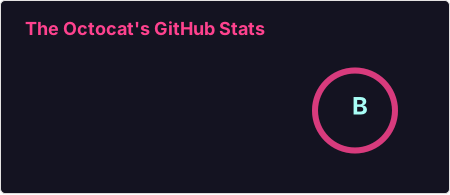
After:
Your parameters stay the same and the card looks the same. The one exception, per the successor's compatibility notes, is slightly different line wrapping on repo and gist descriptions.
How Do You Create a GitHub Profile README?
A GitHub profile README is a normal README.md that GitHub shows at the top of your profile page. It only appears when all four of these rules hold, according to GitHub's profile README docs:
- The repository name matches your username exactly. User
octocatneeds a repo calledoctocat. - The repository is public.
- It has a file named
README.mdin its root. - The file contains some content.
The quickest route is to create a new repository with your username as its name, select Public, and turn on Add README. GitHub pre-fills that file with a short starter template you can replace. After you create the repo, click Edit README above the right sidebar to open it.
One edge case trips people up. If you created a same-name public repo before July 2020, GitHub won't show it automatically, so open the repo and click Share to profile.
Everything else in this post lives inside that one file. For project READMEs with install and usage sections, our README Markdown guide is the better read.
How Do You Add GitHub Stats to Your README?
A stats card is just a Markdown image, optionally wrapped in a link. Swap octocat for your username:
[](https://github.com/octocat)
That renders an SVG card with icons next to each number, and clicking it opens your profile. Add options as extra query parameters joined with &. These are the options you'll reach for most often:
| Parameter | What it does | Example |
|---|---|---|
show_icons | Adds an icon next to each stat | show_icons=true |
theme | Applies a built-in color theme | theme=tokyonight |
hide | Removes stats from the card | hide=issues,contribs |
hide_rank | Drops the rank circle and narrows the card | hide_rank=true |
include_all_commits | Counts all commits, not just this year's | include_all_commits=true |
custom_title | Replaces the card title | custom_title=My%20GitHub%20Stats |
hide_border | Removes the outline | hide_border=true |
Spaces and apostrophes in custom_title must be percent-encoded, so a space becomes %20 and an apostrophe becomes %27. The rank runs from S (top 1%) through A+, A, A-, B+, B, B- and C+ down to C. It comes from a weighted mix of commits, PRs, reviews, issues, stars and followers.
The card counts public repositories only by default. To include private contributions on the public instance, sign in to the successor's card wizard at github-stats-extended.vercel.app/frontend with its GitHub Private Access option. The wizard also builds the URL for you if you'd rather click than type parameters.
The image syntax itself is standard Markdown. If you want to resize or center a card, our Markdown image guide covers both.
Showing Your Top Languages Card
Languages live on their own endpoint, /api/top-langs. A common mistake is adding language parameters to the stats URL, which has no language section at all.
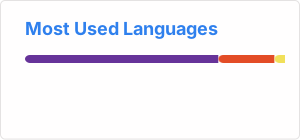
That gives a compact bar of your eight most used languages. The useful options are:
layout:normal,compact,donut,donut-verticalorpie.langs_count: how many languages to show, from 1 to 20.hide: drop languages by name, for examplehide=html,css. Encode symbols, so C++ becomesc%2B%2B.exclude_repo: leave out repositories such as a forked theme or a dotfiles repo.
If the percentages look wrong, check what the card measures. It counts bytes in your own non-forked repositories, regardless of who wrote the commits. Code you pushed to an employer's or an open-source organization's repos doesn't count. On GitHub Stats Extended you can add role=OWNER,ORGANIZATION_MEMBER,COLLABORATOR to include repos where you're a member or collaborator.
Light and Dark Mode Stats Cards
A white card on GitHub's dark theme looks like a hole in the page. You have three ways to fix it, from simplest to most precise.
The transparent theme drops the background, so the card sits on whatever color GitHub uses. Pair it with hide_border=true for the cleanest look.
GitHub Stats Extended also accepts theme_light and theme_dark in one URL. The card then follows the viewer's browser or OS setting. That isn't always the same as their GitHub theme, though.
The precise option is the HTML <picture> element, which GitHub supports in Markdown files:
<picture>
  <source media="(prefers-color-scheme: dark)"
    srcset="https://github-stats-extended.vercel.app/api?username=octocat&show_icons=true&theme=dark_github" />
  <img alt="GitHub stats"
    src="https://github-stats-extended.vercel.app/api?username=octocat&show_icons=true&theme=light_github" />
</picture>
GitHub shows the source image to viewers in dark mode and the img fallback to everyone else. The light_github and dark_github themes match GitHub's own colors.
Public Instance, GitHub Action or Self-Hosted: Which Should You Use?
You now have three working ways to serve the cards. They differ in setup time, how fresh the numbers are, and what happens if someone else's server goes down.
| Public successor instance | GitHub Action | Self-hosted instance | |
|---|---|---|---|
| Setup | Change the domain | Add one workflow file | Fork, deploy, add a token |
| Freshness | Cached, usually for a few days | Each time the workflow runs | You set the cache (default 10 hours) |
| Private stats | Sign in through the wizard | Use a PAT with repo and read:user | Use a PAT with repo and read:user |
| Breaks if a third-party server pauses | Yes | No | Only your own |
The GitHub Readme Stats Action generates the SVGs inside a workflow and commits them to your profile repo. Save this as .github/workflows/grs.yml in your username/username repository:
name: Update README cards

on:
  schedule:
    - cron: "0 0 * * *"
  workflow_dispatch:

jobs:
  build:
    runs-on: ubuntu-latest
    permissions:
      contents: write
    steps:
      - uses: actions/checkout@v6

      - name: Generate stats card
        uses: stats-organization/github-readme-stats-action@v2
        with:
          card: stats
          options: username=${{ github.repository_owner }}&show_icons=true
          path: profile/stats.svg
          token: ${{ secrets.GITHUB_TOKEN }}

      - name: Generate top languages card
        uses: stats-organization/github-readme-stats-action@v2
        with:
          card: top-langs
          options: username=${{ github.repository_owner }}&layout=compact&langs_count=6
          path: profile/top-langs.svg
          token: ${{ secrets.GITHUB_TOKEN }}

      - name: Commit cards
        run: |
          git config user.name "github-actions[bot]"
          git config user.email "41898282+github-actions[bot]@users.noreply.github.com"
          git add profile/*.svg
          git commit -m "Update README cards" || exit 0
          git push
The workflow runs once a day, and the workflow_dispatch trigger lets you run it by hand from the Actions tab. Then embed the files with relative paths: . The built-in GITHUB_TOKEN covers public stats. For private repository stats, store a personal access token as a repository secret and pass it instead.
We prefer the Action. The cards are files in your own repo, so they can't vanish when a shared server pauses, which is exactly what just happened. The trade-off is freshness: numbers only change when the workflow runs. By default a failed API call writes an error card, so set fail_on_error: true if you'd rather the run fail and keep yesterday's card.
Self-hosting suits you if you want fresher numbers than the public cache. The successor's deploy docs cover Docker and Vercel. On Vercel you fork the repo, import it as a project, add your token as an environment variable named PAT_1, and deploy. The docs list a few extra settings, such as tracking the release branch. Then point your card URLs at your own domain.
A GitHub Profile README Template With Stats Cards
Here's a short GitHub profile README template that uses the cards well. It keeps the stats near the bottom, so people read who you are before they see numbers:
### Hi, I'm Octocat
I build small developer tools and write about Git workflows.
- Currently building: a CLI that tidies release notes
- Learning: Rust
- Ask me about: GitHub Actions, Markdown, static sites
**Tech stack:** TypeScript, Go, PostgreSQL, Docker
<a href="https://github.com/octocat">
<img height="170" align="center" alt="GitHub stats" src="https://github-stats-extended.vercel.app/api?username=octocat&show_icons=true&hide_rank=true&theme=transparent" />
</a>
<a href="https://github.com/octocat?tab=repositories">
<img height="170" align="center" alt="Top languages" src="https://github-stats-extended.vercel.app/api/top-langs?username=octocat&layout=compact&langs_count=6&theme=transparent" />
</a>
[](https://github.com/octocat)
Two cards of different heights sit unevenly when you place plain Markdown images side by side. That's why the template uses HTML img tags with a shared height and align="center". The last line is a shields.io badge. Keep it to one or two. You can build more with our badge generator, and our README guide covers which badges are worth adding.
Prefer to start from a form? Our README generator has a profile template with a stats section. Its card lines still point at the paused github-readme-stats.vercel.app domain, so swap in github-stats-extended.vercel.app before you commit.
A quick honesty check before you commit. Many GitHub profile README templates pile on cards and badges, but stats cards only flatter people with steady public activity. If most of your work sits in private company repos, a card showing 40 commits undersells you, so a two-line bio and three pinned repos may say more.
Try the profile draft below. The preview on the right updates as you type, so you can check the list, table and image line before pasting the result into GitHub:
Our preview isn't GitHub, so a few things need checking on GitHub itself. Relative paths such as ./profile/stats.svg only resolve inside your repository, and <picture> theme switching depends on GitHub's own dark mode. For other ways to check rendering before you push, see our guide to previewing GitHub Markdown.
GitHub Readme Stats and Profile README Questions
GitHub Readme Stats cards still work in 2026 once you move off the paused domain. Swap to GitHub Stats Extended for a one-line fix, or let the Action commit the cards to your repo so they never depend on a shared card server. Draft your profile in the editor, check the layout in the preview, then paste it into your username/username repository.